[ work in progress ]
BACKGROUND
This project was inspired by following a close friend's journey learning German as an adult. Watching them navigate the process and seeing the pain points they faced with existing language tools made it clear that something was missing from the market. One area where most language learning apps fall consistently short is speaking, dictation, and pronunciation. As a native speaker, this is something I had never put that much thought into, but it really is one of the most difficult things to get right, and it was very important to my friend that they could reduce their accent and speak with more confidence.
PROBLEM
The phonetic side of language learning is severely underrepresented. If you're a native English speaker, your mouth simply hasn't been trained to produce the sounds required for proper German pronunciation. Learning these sounds can make a real difference, especially for expats. Speaking more clearly helps people feel more integrated into their community and, even if it's not always openly acknowledged, it can open doors to more opportunities specifically if we want to talk about career prospects.
Goal
The main purpose of Sprachly is to help users hold themselves accountable and stay aware of how they are speaking and how they are improving over time. The app focuses specifically on the sounds of the German Phonetic Alphabet (the vowels, diphthongs, and consonants that are most challenging for English speakers) and uses AI to support users in identifying and correcting recurring issues.
Research
The German Phonetic Alphabet is a system used to represent the sounds of spoken language, generally broken down into three categories; vowels, diphthongs, consonants. Instead of relying on traditional spelling, which can be inconsistent, the IPA gives each sound its own unique symbol.
For example, the English words “through,” “though,” and “tough” all use “ough” differently. The IPA removes that confusion by showing exactly how each word is pronounced. It creates a shared, universal way to represent pronunciation across different accents, languages, and voice interfaces.
Regular spelling shows how words are written, the IPA shows how words actually sound.
The vowels, diphthongs, and consonants of the German phonetic alphabet are genuinely foreign to the English tongue. Most apps don't address this at all. Living in Berlin gave me a natural advantage for this research. I'm surrounded by people who have moved from other countries to Germany and are actively navigating the German language every day.
I started by reaching out to people in my network, asking them how they navigate German, what their proficiency level is, and how comfortable they feel speaking. From those conversations, I developed a survey, which I sent out through my circle and encouraged people to share further.
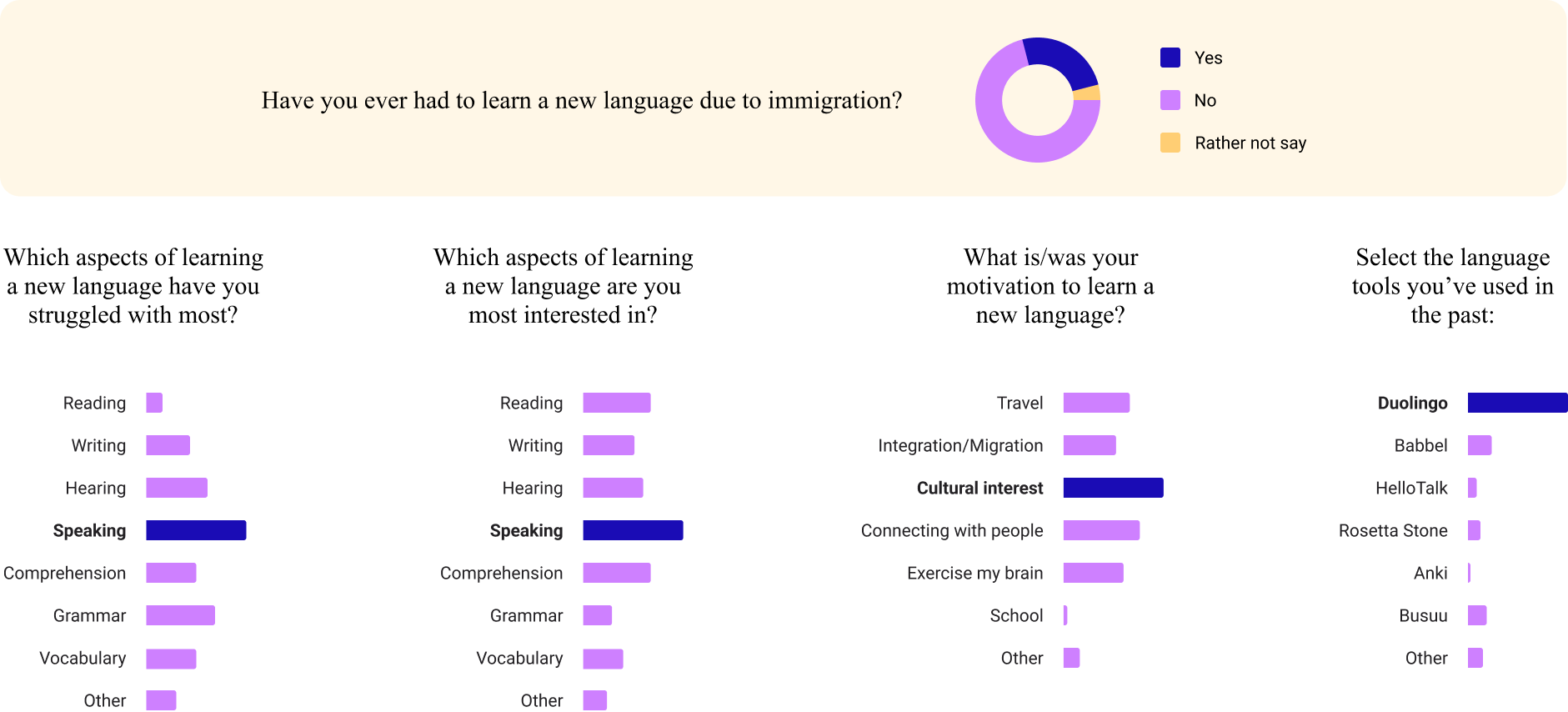
89 responses later, the findings were clear: the majority of people learning a new language do so out of cultural interest. A significant portion (around 25 respondents, nearly a quarter of all responses!) were learning specifically because of immigration. Language learning isn't just a hobby for these users. It's a necessity.
Duolingos success is largely driven by gamification, which keeps users engaged and motivated. But pronunciation correction is not something Duolingo offers. This is the gap Sprachly is designed to fill.
Design [wip]
Sprachly is mobile-first because through research it became clear that most users access their learning tools on their phone. It is also more challenging to fit everything on a small screen versus a larger, so I therefore wanted to be sure that I could all of the functions I wanted into this MVP.
The Product [wip]
Sprachly is available on both web and mobile.
Mobile made sense because language learning is already phone-native (for example, look at Duolingo). Web was included because many users prefer to practice at home at their desktop. Both platforms share the same core functions.
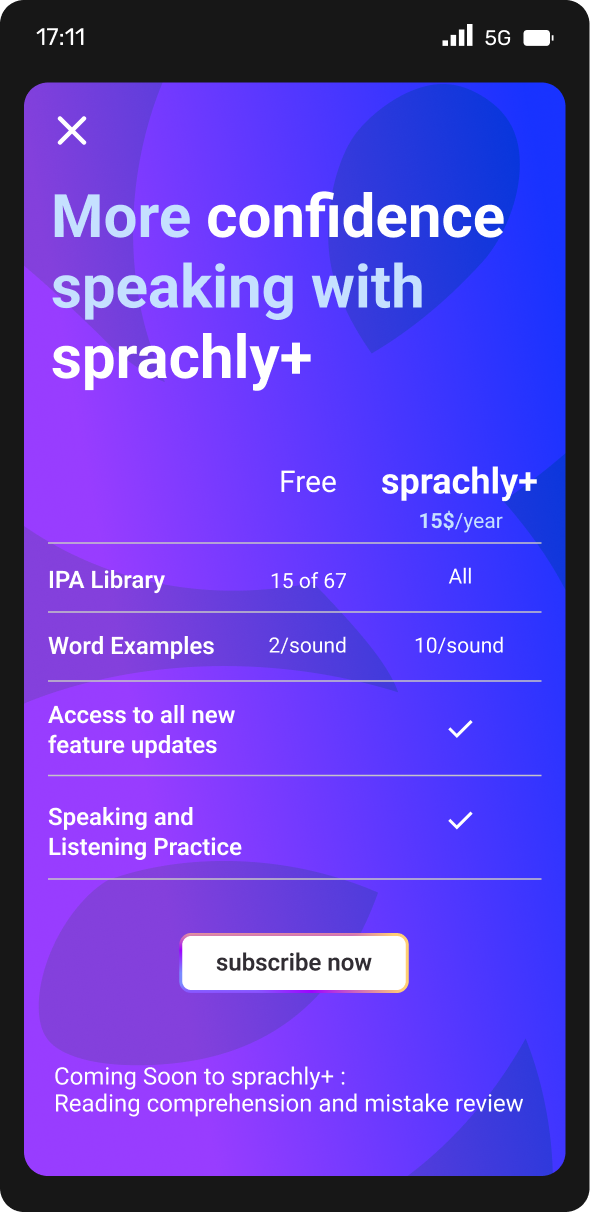
The concept is that there is a fee and a paid version. The free version has 4 sounds available from the three main categories, and 2 complex words associated with it. The remaing sounds and the remaining 8 complex words that come with them, can be unlocked by subscribing for an annual fee.
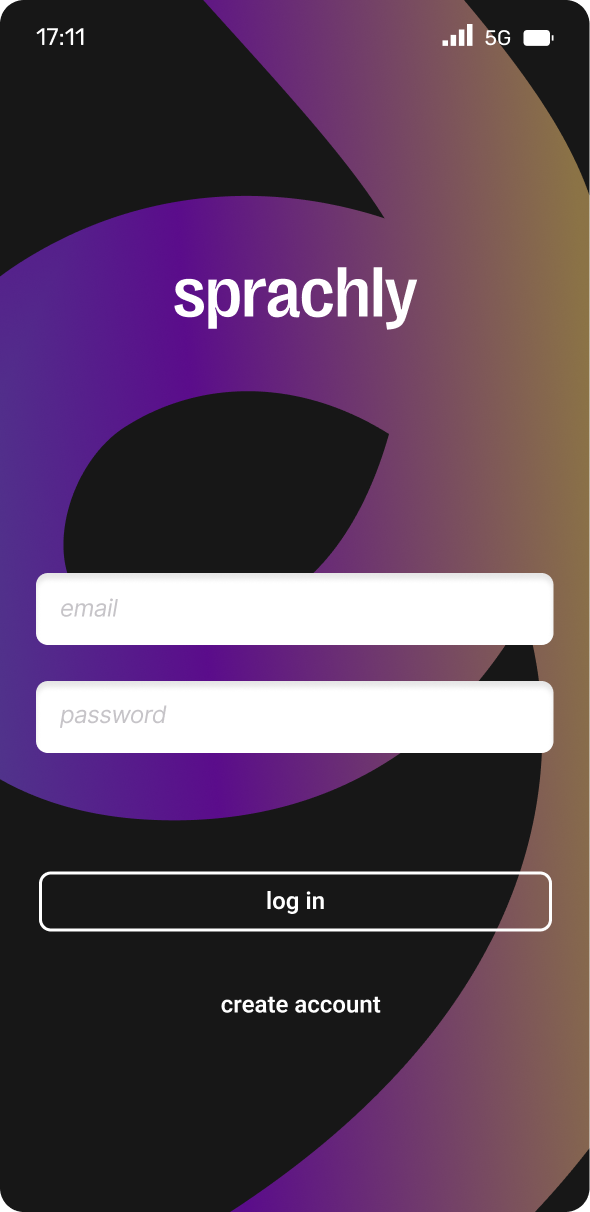
The product is intentionally minimalistic, with four main sections:
1. Dashboard
The home screen gives users a snapshot of their progress. Stats and data keep them informed on where they are in their learning journey and what they've achieved.
2. Lessons
This is where users learn and practice the vowels, consonants, and diphthongs of the German phonetic alphabet. New users have access to four sounds from each category for free, so they can explore the app before committing. All sounds can be unlocked through an annual subscription.
3. Recordings
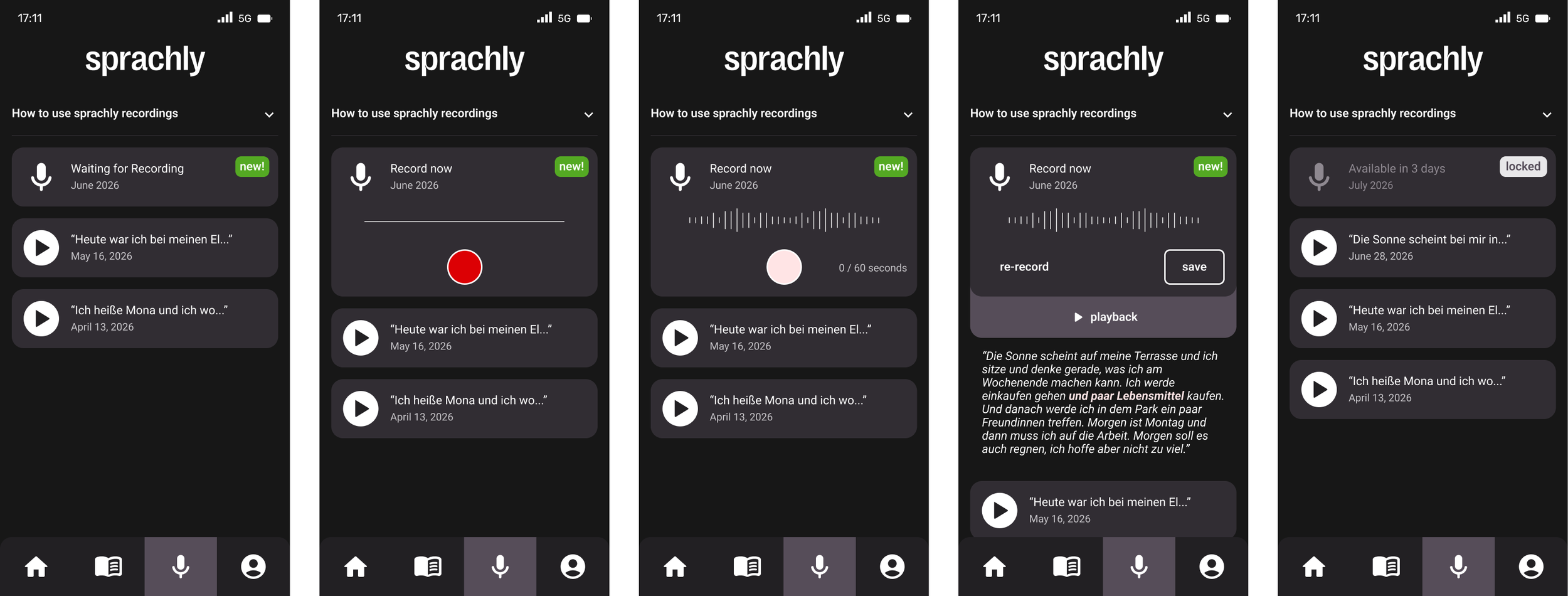
The recordings page is where users can log their voice, track progress over time, and identify recurring issues; whether that's a specific grammatical error or a sound they consistently struggle with. The AI dictation function flags these issues and offers targeted suggestions to help users improve. Users can access this feature once a month to record up to 60 seconds of speech of their choosing, giving them a regular check-in point to measure how far they've come.
4. Profile
A personal account section where users manage their information and account settings.
[Prototype screens / Lovable link]
Prototyping [WIP]
I used Lovable to create a functioning interactive prototype of the Recordings page. My workflow looked like this: I dictated my ideas using a plugin called Handy, brought those transcriptions into Claude to refine and optimize the prompt for Lovable, and then fed the final prompt along with screenshots of all screens into Lovable to build out the interactive prototype.
“This is a mobile app for German language learners to practice their spoken German through free-form voice recordings — no prompts, phrases, or guided content are provided by the app. Users simply record themselves speaking freely in German whenever they want. Think of it like a voice journal for language practice. The prototype covers one specific user flow across 5 screens, all within the Recordings section of the app. Do not navigate to any other menu items. Keep the bottom navigation visible but non-functional (tapping other tabs does nothing). ———— Global Rules (do not override any of these):
Do not change fonts, colors, spacing, sizing, logo, or any clearly defined design elements
The prototype must be fully interactive for the 5-screen flow described above
Bottom navigation should be visible but tapping other tabs does nothing — only the current section is active
Do not navigate outside this flow”
This workflow turned out to be more efficient than working directly in Figma. Lovable made it easy to share designs through a link, iterate quickly without touching source files, and try out new ideas without any risk to the original designs.
https://sprachly-recordings.lovable.app/
AI Tools Used


Handy is a dictation tool that accurately transcribes speech in real time. It eased the entire writing process, because it lets me speak naturally and captures my words exactly as I say them. Everything is still in my own voice.
Claude was useful for refining prompts before taking them into Lovable, and for bouncing ideas off of when it came to structuring the case study and thinking through best practices.
Lovable is the real standout from this project. It helped me visualise designs in a way that was faster and more shareable than Figma, and it rarely broke the way Figma prototypes tend to. Being able to iterate quickly and share a live link made a noticeable difference to the workflow.
Final Score
The main challenge with a product like this is maintaining a clear, consistent focus on phonetics. Everything needs to keep coming back to the core question: is the user actually learning how to produce sounds correctly? Without a teacher in the room, the app has to carry that responsibility and that sets a high bar for how the AI feedback is designed and delivered. The only real way to find out if this is something that german language learners find useful, is by taking it to the streets an having them test it.
Next Steps
Continue building out the Lovable prototype across all screens. Given how minimalistic the app is, this feels very achievable and I plan to make it available in the case study soon.
Deepen the AI dictation logic. Right now the concept covers flagging errors, but the next step is making those flags genuinely useful, not just identifying what's wrong, but offering specific, personalized suggestions for how to correct it. The goal is feedback that feels tailored to the individual user, not generic.
What I Learned
Working on Sprachly reinforced how important it is to stay close to real user needs. The insight that drove this entire project came from simply paying attention to someone I knew struggling with a real problem. That kind of proximity to the user is hard to replicate with research alone, and it kept me grounded throughout the process.
It also pushed me to explore new tools and workflows. Combining Handy, Claude, and Lovable in sequence turned out to be genuinely efficient and it's a pipeline I'll carry into future projects.